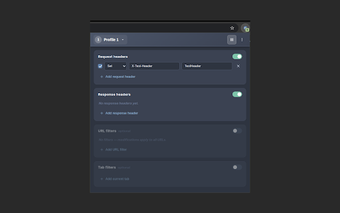
OpenHeader: a compact browser tool for on-the-fly HTTP header testing
OpenHeader, created by kevinchua6, is a lightweight, open-source Chrome extension for manipulating HTTP headers during local testing and debugging. It lets users add, modify, or remove request and response headers in real time, apply URL filtering with regular expressions, and toggle a dark or light interface without needing an account. The extension focuses on a minimalist interface and quick rule setup that avoids cloud synchronization or telemetry. It targets web developers, QA testers, and security researchers needing fast, browser-level header control during development and audits.
Which development and testing workflows make the most sense for this extension?
The extension fits short, browser-centric tests more than long-term interception workflows. It operates inside the browser so testers can create and enable rules quickly for local debugging or single-session security checks. Typical uses are simulating altered server responses or toggling headers during feature tests, where in-browser rule toggles replace the need for external proxy configuration for ad-hoc checks.
How light is OpenHeader and what trade-offs come with that design?
Its small footprint supports quick installs and minimal setup, but limits deep traffic analysis. The add-on is described as extremely lightweight (under 20KiB) and exposes a simple interface, which keeps runtime overhead low for routine testing. The trade-off is a focused toolset: it prioritizes immediate header edits and rule toggling rather than persistent capture, traffic replay, or advanced inspection found in proxy suites.
What privacy posture and platform fit does the extension provide?
The extension emphasizes local operation and minimal data handling while running on Chromium browsers. The developer discloses zero data collection or telemetry and no account requirement, so all rule changes happen locally in the browser. It is available for Chrome and other Chromium-based browsers, and the project is open-source under the MIT License, allowing code inspection or contributions for teams that require transparency.
A practical, focused tool for single-browser header testing with one clear trade-off
OpenHeader is a practical option for developers and testers who need rapid, in-browser header manipulation during local debugging and audits; it emphasizes low friction and privacy by operating locally and avoiding telemetry. The main trade-off is that it does not replace full proxy tools for persistent capture or team-shared workflows. Tip: restrict rule scope with the extension's pattern filters to keep tests targeted and safe.